An anchor of an item to which positions can be attached to. More...
Public Member Functions | |
| QCPItemAnchor (QCustomPlot *parentPlot, QCPAbstractItem *parentItem, const QString &name, int anchorId=-1) | |
| QString | name () const |
| virtual QPointF | pixelPosition () const |
Protected Member Functions | |
| virtual QCPItemPosition * | toQCPItemPosition () |
| void | addChildX (QCPItemPosition *pos) |
| void | removeChildX (QCPItemPosition *pos) |
| void | addChildY (QCPItemPosition *pos) |
| void | removeChildY (QCPItemPosition *pos) |
Protected Attributes | |
| QString | mName |
| QCustomPlot * | mParentPlot |
| QCPAbstractItem * | mParentItem |
| int | mAnchorId |
| QSet< QCPItemPosition * > | mChildrenX |
| QSet< QCPItemPosition * > | mChildrenY |
Friends | |
| class | QCPItemPosition |
Detailed Description
An anchor of an item to which positions can be attached to.
An item (QCPAbstractItem) may have one or more anchors. Unlike QCPItemPosition, an anchor doesn't control anything on its item, but provides a way to tie other items via their positions to the anchor.
For example, a QCPItemRect is defined by its positions topLeft and bottomRight. Additionally it has various anchors like top, topRight or bottomLeft etc. So you can attach the start (which is a QCPItemPosition) of a QCPItemLine to one of the anchors by calling QCPItemPosition::setParentAnchor on start, passing the wanted anchor of the QCPItemRect. This way the start of the line will now always follow the respective anchor location on the rect item.
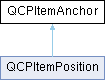
Note that QCPItemPosition derives from QCPItemAnchor, so every position can also serve as an anchor to other positions.
To learn how to provide anchors in your own item subclasses, see the subclassing section of the QCPAbstractItem documentation.
Constructor & Destructor Documentation
◆ QCPItemAnchor()
| QCPItemAnchor::QCPItemAnchor | ( | QCustomPlot * | parentPlot, |
| QCPAbstractItem * | parentItem, | ||
| const QString & | name, | ||
| int | anchorId = -1 ) |
Creates a new QCPItemAnchor. You shouldn't create QCPItemAnchor instances directly, even if you want to make a new item subclass. Use QCPAbstractItem::createAnchor instead, as explained in the subclassing section of the QCPAbstractItem documentation.
Member Function Documentation
◆ pixelPosition()
|
virtual |
Returns the final absolute pixel position of the QCPItemAnchor on the QCustomPlot surface.
The pixel information is internally retrieved via QCPAbstractItem::anchorPixelPosition of the parent item, QCPItemAnchor is just an intermediary.
Reimplemented in QCPItemPosition.
◆ toQCPItemPosition()
|
inlineprotectedvirtual |
Returns nullptr if this instance is merely a QCPItemAnchor, and a valid pointer of type QCPItemPosition* if it actually is a QCPItemPosition (which is a subclass of QCPItemAnchor).
This safe downcast functionality could also be achieved with a dynamic_cast. However, QCustomPlot avoids dynamic_cast to work with projects that don't have RTTI support enabled (e.g. -fno-rtti flag with gcc compiler).
Reimplemented in QCPItemPosition.
The documentation for this class was generated from the following files:
- qcustomplot.h
- qcustomplot.cpp