Manages a single axis inside a QCustomPlot. More...
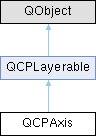
Public Types | |
| enum | AxisType { atLeft = 0x01 , atRight = 0x02 , atTop = 0x04 , atBottom = 0x08 } |
| enum | LabelSide { lsInside , lsOutside } |
| enum | ScaleType { stLinear , stLogarithmic } |
| enum | SelectablePart { spNone = 0 , spAxis = 0x001 , spTickLabels = 0x002 , spAxisLabel = 0x004 } |
Signals | |
| void | rangeChanged (const QCPRange &newRange) |
| void | rangeChanged (const QCPRange &newRange, const QCPRange &oldRange) |
| void | scaleTypeChanged (QCPAxis::ScaleType scaleType) |
| void | selectionChanged (const QCPAxis::SelectableParts &parts) |
| void | selectableChanged (const QCPAxis::SelectableParts &parts) |
| Signals inherited from QCPLayerable | |
| void | layerChanged (QCPLayer *newLayer) |
Public Member Functions | |
| QCPAxis (QCPAxisRect *parent, AxisType type) | |
| AxisType | axisType () const |
| QCPAxisRect * | axisRect () const |
| ScaleType | scaleType () const |
| const QCPRange | range () const |
| bool | rangeReversed () const |
| QSharedPointer< QCPAxisTicker > | ticker () const |
| bool | ticks () const |
| bool | tickLabels () const |
| int | tickLabelPadding () const |
| QFont | tickLabelFont () const |
| QColor | tickLabelColor () const |
| double | tickLabelRotation () const |
| LabelSide | tickLabelSide () const |
| QString | numberFormat () const |
| int | numberPrecision () const |
| QVector< double > | tickVector () const |
| QVector< QString > | tickVectorLabels () const |
| int | tickLengthIn () const |
| int | tickLengthOut () const |
| bool | subTicks () const |
| int | subTickLengthIn () const |
| int | subTickLengthOut () const |
| QPen | basePen () const |
| QPen | tickPen () const |
| QPen | subTickPen () const |
| QFont | labelFont () const |
| QColor | labelColor () const |
| QString | label () const |
| int | labelPadding () const |
| int | padding () const |
| int | offset () const |
| SelectableParts | selectedParts () const |
| SelectableParts | selectableParts () const |
| QFont | selectedTickLabelFont () const |
| QFont | selectedLabelFont () const |
| QColor | selectedTickLabelColor () const |
| QColor | selectedLabelColor () const |
| QPen | selectedBasePen () const |
| QPen | selectedTickPen () const |
| QPen | selectedSubTickPen () const |
| QCPLineEnding | lowerEnding () const |
| QCPLineEnding | upperEnding () const |
| QCPGrid * | grid () const |
| Q_SLOT void | setScaleType (QCPAxis::ScaleType type) |
| Q_SLOT void | setRange (const QCPRange &range) |
| void | setRange (double lower, double upper) |
| void | setRange (double position, double size, Qt::AlignmentFlag alignment) |
| void | setRangeLower (double lower) |
| void | setRangeUpper (double upper) |
| void | setRangeReversed (bool reversed) |
| void | setTicker (QSharedPointer< QCPAxisTicker > ticker) |
| void | setTicks (bool show) |
| void | setTickLabels (bool show) |
| void | setTickLabelPadding (int padding) |
| void | setTickLabelFont (const QFont &font) |
| void | setTickLabelColor (const QColor &color) |
| void | setTickLabelRotation (double degrees) |
| void | setTickLabelSide (LabelSide side) |
| void | setNumberFormat (const QString &formatCode) |
| void | setNumberPrecision (int precision) |
| void | setTickLength (int inside, int outside=0) |
| void | setTickLengthIn (int inside) |
| void | setTickLengthOut (int outside) |
| void | setSubTicks (bool show) |
| void | setSubTickLength (int inside, int outside=0) |
| void | setSubTickLengthIn (int inside) |
| void | setSubTickLengthOut (int outside) |
| void | setBasePen (const QPen &pen) |
| void | setTickPen (const QPen &pen) |
| void | setSubTickPen (const QPen &pen) |
| void | setLabelFont (const QFont &font) |
| void | setLabelColor (const QColor &color) |
| void | setLabel (const QString &str) |
| void | setLabelPadding (int padding) |
| void | setPadding (int padding) |
| void | setOffset (int offset) |
| void | setSelectedTickLabelFont (const QFont &font) |
| void | setSelectedLabelFont (const QFont &font) |
| void | setSelectedTickLabelColor (const QColor &color) |
| void | setSelectedLabelColor (const QColor &color) |
| void | setSelectedBasePen (const QPen &pen) |
| void | setSelectedTickPen (const QPen &pen) |
| void | setSelectedSubTickPen (const QPen &pen) |
| Q_SLOT void | setSelectableParts (const QCPAxis::SelectableParts &selectableParts) |
| Q_SLOT void | setSelectedParts (const QCPAxis::SelectableParts &selectedParts) |
| void | setLowerEnding (const QCPLineEnding &ending) |
| void | setUpperEnding (const QCPLineEnding &ending) |
| virtual double | selectTest (const QPointF &pos, bool onlySelectable, QVariant *details=nullptr) const Q_DECL_OVERRIDE |
| Qt::Orientation | orientation () const |
| int | pixelOrientation () const |
| void | moveRange (double diff) |
| void | scaleRange (double factor) |
| void | scaleRange (double factor, double center) |
| void | setScaleRatio (const QCPAxis *otherAxis, double ratio=1.0) |
| void | rescale (bool onlyVisiblePlottables=false) |
| double | pixelToCoord (double value) const |
| double | coordToPixel (double value) const |
| SelectablePart | getPartAt (const QPointF &pos) const |
| QList< QCPAbstractPlottable * > | plottables () const |
| QList< QCPGraph * > | graphs () const |
| QList< QCPAbstractItem * > | items () const |
| Public Member Functions inherited from QCPLayerable | |
| QCPLayerable (QCustomPlot *plot, QString targetLayer=QString(), QCPLayerable *parentLayerable=nullptr) | |
| bool | visible () const |
| QCustomPlot * | parentPlot () const |
| QCPLayerable * | parentLayerable () const |
| QCPLayer * | layer () const |
| bool | antialiased () const |
| void | setVisible (bool on) |
| Q_SLOT bool | setLayer (QCPLayer *layer) |
| bool | setLayer (const QString &layerName) |
| void | setAntialiased (bool enabled) |
| bool | realVisibility () const |
Static Public Member Functions | |
| static AxisType | marginSideToAxisType (QCP::MarginSide side) |
| static Qt::Orientation | orientation (AxisType type) |
| static AxisType | opposite (AxisType type) |
Protected Member Functions | |
| virtual int | calculateMargin () |
| virtual void | applyDefaultAntialiasingHint (QCPPainter *painter) const Q_DECL_OVERRIDE |
| virtual void | draw (QCPPainter *painter) Q_DECL_OVERRIDE |
| virtual QCP::Interaction | selectionCategory () const Q_DECL_OVERRIDE |
| virtual void | selectEvent (QMouseEvent *event, bool additive, const QVariant &details, bool *selectionStateChanged) Q_DECL_OVERRIDE |
| virtual void | deselectEvent (bool *selectionStateChanged) Q_DECL_OVERRIDE |
| virtual void | mousePressEvent (QMouseEvent *event, const QVariant &details) Q_DECL_OVERRIDE |
| virtual void | mouseMoveEvent (QMouseEvent *event, const QPointF &startPos) Q_DECL_OVERRIDE |
| virtual void | mouseReleaseEvent (QMouseEvent *event, const QPointF &startPos) Q_DECL_OVERRIDE |
| virtual void | wheelEvent (QWheelEvent *event) Q_DECL_OVERRIDE |
| void | setupTickVectors () |
| QPen | getBasePen () const |
| QPen | getTickPen () const |
| QPen | getSubTickPen () const |
| QFont | getTickLabelFont () const |
| QFont | getLabelFont () const |
| QColor | getTickLabelColor () const |
| QColor | getLabelColor () const |
| Protected Member Functions inherited from QCPLayerable | |
| virtual void | parentPlotInitialized (QCustomPlot *parentPlot) |
| virtual QRect | clipRect () const |
| virtual void | mouseDoubleClickEvent (QMouseEvent *event, const QVariant &details) |
| void | initializeParentPlot (QCustomPlot *parentPlot) |
| void | setParentLayerable (QCPLayerable *parentLayerable) |
| bool | moveToLayer (QCPLayer *layer, bool prepend) |
| void | applyAntialiasingHint (QCPPainter *painter, bool localAntialiased, QCP::AntialiasedElement overrideElement) const |
Protected Attributes | |
| AxisType | mAxisType |
| QCPAxisRect * | mAxisRect |
| int | mPadding |
| Qt::Orientation | mOrientation |
| SelectableParts | mSelectableParts |
| SelectableParts | mSelectedParts |
| QPen | mBasePen |
| QPen | mSelectedBasePen |
| QString | mLabel |
| QFont | mLabelFont |
| QFont | mSelectedLabelFont |
| QColor | mLabelColor |
| QColor | mSelectedLabelColor |
| bool | mTickLabels |
| QFont | mTickLabelFont |
| QFont | mSelectedTickLabelFont |
| QColor | mTickLabelColor |
| QColor | mSelectedTickLabelColor |
| int | mNumberPrecision |
| QLatin1Char | mNumberFormatChar |
| bool | mNumberBeautifulPowers |
| bool | mTicks |
| bool | mSubTicks |
| QPen | mTickPen |
| QPen | mSelectedTickPen |
| QPen | mSubTickPen |
| QPen | mSelectedSubTickPen |
| QCPRange | mRange |
| bool | mRangeReversed |
| ScaleType | mScaleType |
| QCPGrid * | mGrid |
| QCPAxisPainterPrivate * | mAxisPainter |
| QSharedPointer< QCPAxisTicker > | mTicker |
| QVector< double > | mTickVector |
| QVector< QString > | mTickVectorLabels |
| QVector< double > | mSubTickVector |
| bool | mCachedMarginValid |
| int | mCachedMargin |
| bool | mDragging |
| QCPRange | mDragStartRange |
| QCP::AntialiasedElements | mAADragBackup |
| QCP::AntialiasedElements | mNotAADragBackup |
| Protected Attributes inherited from QCPLayerable | |
| bool | mVisible |
| QCustomPlot * | mParentPlot |
| QPointer< QCPLayerable > | mParentLayerable |
| QCPLayer * | mLayer |
| bool | mAntialiased |
Friends | |
| class | QCustomPlot |
| class | QCPGrid |
| class | QCPAxisRect |
Detailed Description
Manages a single axis inside a QCustomPlot.
Usually doesn't need to be instantiated externally. Access QCustomPlot's default four axes via QCustomPlot::xAxis (bottom), QCustomPlot::yAxis (left), QCustomPlot::xAxis2 (top) and QCustomPlot::yAxis2 (right).
Axes are always part of an axis rect, see QCPAxisRect.


Each axis holds an instance of QCPAxisTicker which is used to generate the tick coordinates and tick labels. You can access the currently installed ticker or set a new one (possibly one of the specialized subclasses, or your own subclass) via setTicker. For details, see the documentation of QCPAxisTicker.
Member Enumeration Documentation
◆ AxisType
| enum QCPAxis::AxisType |
Defines at which side of the axis rect the axis will appear. This also affects how the tick marks are drawn, on which side the labels are placed etc.
◆ LabelSide
| enum QCPAxis::LabelSide |
Defines on which side of the axis the tick labels (numbers) shall appear.
- See also
- setTickLabelSide
| Enumerator | |
|---|---|
| lsInside | Tick labels will be displayed inside the axis rect and clipped to the inner axis rect. |
| lsOutside | Tick labels will be displayed outside the axis rect. |
◆ ScaleType
| enum QCPAxis::ScaleType |
Defines the scale of an axis.
- See also
- setScaleType
| Enumerator | |
|---|---|
| stLinear | Linear scaling. |
| stLogarithmic | Logarithmic scaling with correspondingly transformed axis coordinates (possibly also setTicker to a QCPAxisTickerLog instance). |
◆ SelectablePart
Defines the selectable parts of an axis.
- See also
- setSelectableParts, setSelectedParts
| Enumerator | |
|---|---|
| spNone | None of the selectable parts. |
| spAxis | The axis backbone and tick marks. |
| spTickLabels | Tick labels (numbers) of this axis (as a whole, not individually) |
| spAxisLabel | The axis label. |
Constructor & Destructor Documentation
◆ QCPAxis()
|
explicit |
Constructs an Axis instance of Type type for the axis rect parent.
Usually it isn't necessary to instantiate axes directly, because you can let QCustomPlot create them for you with QCPAxisRect::addAxis. If you want to use own QCPAxis-subclasses however, create them manually and then inject them also via QCPAxisRect::addAxis.
Member Function Documentation
◆ applyDefaultAntialiasingHint()
|
protectedvirtual |
Implements QCPLayerable.
◆ coordToPixel()
| double QCPAxis::coordToPixel | ( | double | value | ) | const |
Transforms value, in coordinates of the axis, to pixel coordinates of the QCustomPlot widget.
◆ deselectEvent()
|
protectedvirtual |
Reimplemented from QCPLayerable.
◆ draw()
|
protectedvirtual |
Implements QCPLayerable.
◆ getPartAt()
| QCPAxis::SelectablePart QCPAxis::getPartAt | ( | const QPointF & | pos | ) | const |
Returns the part of the axis that is hit by pos (in pixels). The return value of this function is independent of the user-selectable parts defined with setSelectableParts. Further, this function does not change the current selection state of the axis.
If the axis is not visible (setVisible), this function always returns spNone.
◆ graphs()
| QList< QCPGraph * > QCPAxis::graphs | ( | ) | const |
Returns a list of all the graphs that have this axis as key or value axis.
- See also
- plottables, items
◆ grid()
|
inline |
Returns the QCPGrid instance belonging to this axis. Access it to set details about the way the grid is displayed.
◆ items()
| QList< QCPAbstractItem * > QCPAxis::items | ( | ) | const |
Returns a list of all the items that are associated with this axis. An item is considered associated with an axis if at least one of its positions uses the axis as key or value axis.
- See also
- plottables, graphs
◆ marginSideToAxisType()
|
static |
Transforms a margin side to the logically corresponding axis type. (QCP::msLeft to QCPAxis::atLeft, QCP::msRight to QCPAxis::atRight, etc.)
◆ mouseMoveEvent()
|
protectedvirtual |
This event gets called when the user moves the mouse while holding a mouse button, after this layerable has become the mouse grabber by accepting the preceding mousePressEvent.
The current pixel position of the cursor on the QCustomPlot widget is accessible via event->pos(). The parameter startPos indicates the position where the initial mousePressEvent occurred, that started the mouse interaction.
The default implementation does nothing.
Reimplemented from QCPLayerable.
◆ mousePressEvent()
|
protectedvirtual |
This event gets called when the user presses a mouse button while the cursor is over the layerable. Whether a cursor is over the layerable is decided by a preceding call to selectTest.
The current pixel position of the cursor on the QCustomPlot widget is accessible via event->pos(). The parameter details contains layerable-specific details about the hit, which were generated in the previous call to selectTest. For example, One-dimensional plottables like QCPGraph or QCPBars convey the clicked data point in the details parameter, as QCPDataSelection packed as QVariant. Multi-part objects convey the specific SelectablePart that was hit (e.g. QCPAxis::SelectablePart in the case of axes).
QCustomPlot uses an event propagation system that works the same as Qt's system. If your layerable doesn't reimplement the mousePressEvent or explicitly calls event->ignore() in its reimplementation, the event will be propagated to the next layerable in the stacking order.
Once a layerable has accepted the mousePressEvent, it is considered the mouse grabber and will receive all following calls to mouseMoveEvent or mouseReleaseEvent for this mouse interaction (a "mouse interaction" in this context ends with the release).
The default implementation does nothing except explicitly ignoring the event with event->ignore().
Reimplemented from QCPLayerable.
◆ mouseReleaseEvent()
|
protectedvirtual |
This event gets called when the user releases the mouse button, after this layerable has become the mouse grabber by accepting the preceding mousePressEvent.
The current pixel position of the cursor on the QCustomPlot widget is accessible via event->pos(). The parameter startPos indicates the position where the initial mousePressEvent occurred, that started the mouse interaction.
The default implementation does nothing.
Reimplemented from QCPLayerable.
◆ moveRange()
| void QCPAxis::moveRange | ( | double | diff | ) |
If the scale type (setScaleType) is stLinear, diff is added to the lower and upper bounds of the range. The range is simply moved by diff.
If the scale type is stLogarithmic, the range bounds are multiplied by diff. This corresponds to an apparent "linear" move in logarithmic scaling by a distance of log(diff).
◆ opposite()
|
static |
Returns the axis type that describes the opposite axis of an axis with the specified type.
◆ orientation() [1/2]
|
inline |
Returns the orientation of this axis. The axis orientation (horizontal or vertical) is deduced from the axis type (left, top, right or bottom).
◆ orientation() [2/2]
|
inlinestatic |
Returns the orientation of the specified axis type
- See also
- orientation(), pixelOrientation
◆ pixelOrientation()
|
inline |
Returns which direction points towards higher coordinate values/keys, in pixel space.
This method returns either 1 or -1. If it returns 1, then going in the positive direction along the orientation of the axis in pixels corresponds to going from lower to higher axis coordinates. On the other hand, if this method returns -1, going to smaller pixel values corresponds to going from lower to higher axis coordinates.
For example, this is useful to easily shift axis coordinates by a certain amount given in pixels, without having to care about reversed or vertically aligned axes:
newKey will then contain a key that is ten pixels towards higher keys, starting from oldKey.
◆ pixelToCoord()
| double QCPAxis::pixelToCoord | ( | double | value | ) | const |
Transforms value, in pixel coordinates of the QCustomPlot widget, to axis coordinates.
◆ plottables()
| QList< QCPAbstractPlottable * > QCPAxis::plottables | ( | ) | const |
◆ rangeChanged [1/2]
|
signal |
This signal is emitted when the range of this axis has changed. You can connect it to the setRange slot of another axis to communicate the new range to the other axis, in order for it to be synchronized.
You may also manipulate/correct the range with setRange in a slot connected to this signal. This is useful if for example a maximum range span shall not be exceeded, or if the lower/upper range shouldn't go beyond certain values (see QCPRange::bounded). For example, the following slot would limit the x axis to ranges between 0 and 10:
◆ rangeChanged [2/2]
This is an overloaded member function, provided for convenience. It differs from the above function only in what argument(s) it accepts.
Additionally to the new range, this signal also provides the previous range held by the axis as oldRange.
◆ rescale()
| void QCPAxis::rescale | ( | bool | onlyVisiblePlottables = false | ) |
Changes the axis range such that all plottables associated with this axis are fully visible in that dimension.
◆ scaleRange() [1/2]
| void QCPAxis::scaleRange | ( | double | factor | ) |
Scales the range of this axis by factor around the center of the current axis range. For example, if factor is 2.0, then the axis range will double its size, and the point at the axis range center won't have changed its position in the QCustomPlot widget (i.e. coordinates around the center will have moved symmetrically closer).
If you wish to scale around a different coordinate than the current axis range center, use the overload scaleRange(double factor, double center).
◆ scaleRange() [2/2]
| void QCPAxis::scaleRange | ( | double | factor, |
| double | center ) |
This is an overloaded member function, provided for convenience. It differs from the above function only in what argument(s) it accepts.
Scales the range of this axis by factor around the coordinate center. For example, if factor is 2.0, center is 1.0, then the axis range will double its size, and the point at coordinate 1.0 won't have changed its position in the QCustomPlot widget (i.e. coordinates around 1.0 will have moved symmetrically closer to 1.0).
- See also
- scaleRange(double factor)
◆ scaleTypeChanged
|
signal |
This signal is emitted when the scale type changes, by calls to setScaleType
◆ selectableChanged
|
signal |
This signal is emitted when the selectability changes, by calls to setSelectableParts
◆ selectEvent()
|
protectedvirtual |
Reimplemented from QCPLayerable.
◆ selectionCategory()
|
protectedvirtual |
Reimplemented from QCPLayerable.
◆ selectionChanged
|
signal |
This signal is emitted when the selection state of this axis has changed, either by user interaction or by a direct call to setSelectedParts.
◆ selectTest()
|
virtual |
This function is used to decide whether a click hits a layerable object or not.
pos is a point in pixel coordinates on the QCustomPlot surface. This function returns the shortest pixel distance of this point to the object. If the object is either invisible or the distance couldn't be determined, -1.0 is returned. Further, if onlySelectable is true and the object is not selectable, -1.0 is returned, too.
If the object is represented not by single lines but by an area like a QCPItemText or the bars of a QCPBars plottable, a click inside the area should also be considered a hit. In these cases this function thus returns a constant value greater zero but still below the parent plot's selection tolerance. (typically the selectionTolerance multiplied by 0.99).
Providing a constant value for area objects allows selecting line objects even when they are obscured by such area objects, by clicking close to the lines (i.e. closer than 0.99*selectionTolerance).
The actual setting of the selection state is not done by this function. This is handled by the parent QCustomPlot when the mouseReleaseEvent occurs, and the finally selected object is notified via the selectEvent/ deselectEvent methods.
details is an optional output parameter. Every layerable subclass may place any information in details. This information will be passed to selectEvent when the parent QCustomPlot decides on the basis of this selectTest call, that the object was successfully selected. The subsequent call to selectEvent will carry the details. This is useful for multi-part objects (like QCPAxis). This way, a possibly complex calculation to decide which part was clicked is only done once in selectTest. The result (i.e. the actually clicked part) can then be placed in details. So in the subsequent selectEvent, the decision which part was selected doesn't have to be done a second time for a single selection operation.
In the case of 1D Plottables (QCPAbstractPlottable1D, like QCPGraph or QCPBars) details will be set to a QCPDataSelection, describing the closest data point to pos.
You may pass nullptr as details to indicate that you are not interested in those selection details.
- See also
- selectEvent, deselectEvent, mousePressEvent, wheelEvent, QCustomPlot::setInteractions, QCPAbstractPlottable1D::selectTestRect
Reimplemented from QCPLayerable.
◆ setBasePen()
| void QCPAxis::setBasePen | ( | const QPen & | pen | ) |
Sets the pen, the axis base line is drawn with.
- See also
- setTickPen, setSubTickPen
◆ setLabel()
| void QCPAxis::setLabel | ( | const QString & | str | ) |
Sets the text of the axis label that will be shown below/above or next to the axis, depending on its orientation. To disable axis labels, pass an empty string as str.
◆ setLabelColor()
| void QCPAxis::setLabelColor | ( | const QColor & | color | ) |
Sets the color of the axis label.
- See also
- setLabelFont
◆ setLabelFont()
| void QCPAxis::setLabelFont | ( | const QFont & | font | ) |
Sets the font of the axis label.
- See also
- setLabelColor
◆ setLabelPadding()
| void QCPAxis::setLabelPadding | ( | int | padding | ) |
Sets the distance between the tick labels and the axis label.
- See also
- setTickLabelPadding, setPadding
◆ setLowerEnding()
| void QCPAxis::setLowerEnding | ( | const QCPLineEnding & | ending | ) |
Sets the style for the lower axis ending. See the documentation of QCPLineEnding for available styles.
For horizontal axes, this method refers to the left ending, for vertical axes the bottom ending. Note that this meaning does not change when the axis range is reversed with setRangeReversed.
- See also
- setUpperEnding
◆ setNumberFormat()
| void QCPAxis::setNumberFormat | ( | const QString & | formatCode | ) |
Sets the number format for the numbers in tick labels. This formatCode is an extended version of the format code used e.g. by QString::number() and QLocale::toString(). For reference about that, see the "Argument Formats" section in the detailed description of the QString class.
formatCode is a string of one, two or three characters.
The first character is identical to the normal format code used by Qt. In short, this means: 'e'/'E' scientific format, 'f' fixed format, 'g'/'G' scientific or fixed, whichever is shorter. For the 'e', 'E', and 'f' formats, the precision set by setNumberPrecision represents the number of digits after the decimal point. For the 'g' and 'G' formats, the precision represents the maximum number of significant digits, trailing zeroes are omitted.
The second and third characters are optional and specific to QCustomPlot:
If the first char was 'e' or 'g', numbers are/might be displayed in the scientific format, e.g. "5.5e9", which is ugly in a plot. So when the second char of formatCode is set to 'b' (for "beautiful"), those exponential numbers are formatted in a more natural way, i.e. "5.5
[multiplication sign] 10 [superscript] 9". By default, the multiplication sign is a centered dot. If instead a cross should be shown (as is usual in the USA), the third char of formatCode can be set to 'c'. The inserted multiplication signs are the UTF-8 characters 215 (0xD7) for the cross and 183 (0xB7) for the dot.
Examples for formatCode:
gnormal format code behaviour. If number is small, fixed format is used, if number is large, normal scientific format is usedgbIf number is small, fixed format is used, if number is large, scientific format is used with beautifully typeset decimal powers and a dot as multiplication signebcAll numbers are in scientific format with beautifully typeset decimal power and a cross as multiplication signfbillegal format code, since fixed format doesn't support (or need) beautifully typeset decimal powers. Format code will be reduced to 'f'.helloillegal format code, since first char is not 'e', 'E', 'f', 'g' or 'G'. Current format code will not be changed.
◆ setNumberPrecision()
| void QCPAxis::setNumberPrecision | ( | int | precision | ) |
Sets the precision of the tick label numbers. See QLocale::toString(double i, char f, int prec) for details. The effect of precisions are most notably for number Formats starting with 'e', see setNumberFormat
◆ setOffset()
| void QCPAxis::setOffset | ( | int | offset | ) |
Sets the offset the axis has to its axis rect side.
If an axis rect side has multiple axes and automatic margin calculation is enabled for that side, only the offset of the inner most axis has meaning (even if it is set to be invisible). The offset of the other, outer axes is controlled automatically, to place them at appropriate positions.
◆ setPadding()
| void QCPAxis::setPadding | ( | int | padding | ) |
Sets the padding of the axis.
When QCPAxisRect::setAutoMargins is enabled, the padding is the additional outer most space, that is left blank.
The axis padding has no meaning if QCPAxisRect::setAutoMargins is disabled.
- See also
- setLabelPadding, setTickLabelPadding
◆ setRange() [1/3]
| void QCPAxis::setRange | ( | const QCPRange & | range | ) |
Sets the range of the axis.
This slot may be connected with the rangeChanged signal of another axis so this axis is always synchronized with the other axis range, when it changes.
To invert the direction of an axis, use setRangeReversed.
◆ setRange() [2/3]
| void QCPAxis::setRange | ( | double | lower, |
| double | upper ) |
This is an overloaded member function, provided for convenience. It differs from the above function only in what argument(s) it accepts.
Sets the lower and upper bound of the axis range.
To invert the direction of an axis, use setRangeReversed.
There is also a slot to set a range, see setRange(const QCPRange &range).
◆ setRange() [3/3]
| void QCPAxis::setRange | ( | double | position, |
| double | size, | ||
| Qt::AlignmentFlag | alignment ) |
This is an overloaded member function, provided for convenience. It differs from the above function only in what argument(s) it accepts.
Sets the range of the axis.
The position coordinate indicates together with the alignment parameter, where the new range will be positioned. size defines the size of the new axis range. alignment may be Qt::AlignLeft, Qt::AlignRight or Qt::AlignCenter. This will cause the left border, right border, or center of the range to be aligned with position. Any other values of alignment will default to Qt::AlignCenter.
◆ setRangeLower()
| void QCPAxis::setRangeLower | ( | double | lower | ) |
Sets the lower bound of the axis range. The upper bound is not changed.
- See also
- setRange
◆ setRangeReversed()
| void QCPAxis::setRangeReversed | ( | bool | reversed | ) |
Sets whether the axis range (direction) is displayed reversed. Normally, the values on horizontal axes increase left to right, on vertical axes bottom to top. When reversed is set to true, the direction of increasing values is inverted.
Note that the range and data interface stays the same for reversed axes, e.g. the lower part of the setRange interface will still reference the mathematically smaller number than the upper part.
◆ setRangeUpper()
| void QCPAxis::setRangeUpper | ( | double | upper | ) |
Sets the upper bound of the axis range. The lower bound is not changed.
- See also
- setRange
◆ setScaleRatio()
| void QCPAxis::setScaleRatio | ( | const QCPAxis * | otherAxis, |
| double | ratio = 1.0 ) |
Scales the range of this axis to have a certain scale ratio to otherAxis. The scaling will be done around the center of the current axis range.
For example, if ratio is 1, this axis is the yAxis and otherAxis is xAxis, graphs plotted with those axes will appear in a 1:1 aspect ratio, independent of the aspect ratio the axis rect has.
This is an operation that changes the range of this axis once, it doesn't fix the scale ratio indefinitely. Note that calling this function in the constructor of the QCustomPlot's parent won't have the desired effect, since the widget dimensions aren't defined yet, and a resizeEvent will follow.
◆ setScaleType()
| void QCPAxis::setScaleType | ( | QCPAxis::ScaleType | type | ) |
Sets whether the axis uses a linear scale or a logarithmic scale.
Note that this method controls the coordinate transformation. For logarithmic scales, you will likely also want to use a logarithmic tick spacing and labeling, which can be achieved by setting the axis ticker to an instance of QCPAxisTickerLog :
See the documentation of QCPAxisTickerLog about the details of logarithmic axis tick creation.
◆ setSelectableParts()
| void QCPAxis::setSelectableParts | ( | const QCPAxis::SelectableParts & | selectableParts | ) |
Sets whether the user can (de-)select the parts in selectable by clicking on the QCustomPlot surface. (When QCustomPlot::setInteractions contains iSelectAxes.)
However, even when selectable is set to a value not allowing the selection of a specific part, it is still possible to set the selection of this part manually, by calling setSelectedParts directly.
- See also
- SelectablePart, setSelectedParts
◆ setSelectedBasePen()
| void QCPAxis::setSelectedBasePen | ( | const QPen & | pen | ) |
Sets the pen that is used to draw the axis base line when selected.
◆ setSelectedLabelColor()
| void QCPAxis::setSelectedLabelColor | ( | const QColor & | color | ) |
Sets the color that is used for the axis label when it is selected.
◆ setSelectedLabelFont()
| void QCPAxis::setSelectedLabelFont | ( | const QFont & | font | ) |
Sets the font that is used for the axis label when it is selected.
◆ setSelectedParts()
| void QCPAxis::setSelectedParts | ( | const QCPAxis::SelectableParts & | selectedParts | ) |
Sets the selected state of the respective axis parts described by SelectablePart. When a part is selected, it uses a different pen/font.
The entire selection mechanism for axes is handled automatically when QCustomPlot::setInteractions contains iSelectAxes. You only need to call this function when you wish to change the selection state manually.
This function can change the selection state of a part, independent of the setSelectableParts setting.
emits the selectionChanged signal when selected is different from the previous selection state.
◆ setSelectedSubTickPen()
| void QCPAxis::setSelectedSubTickPen | ( | const QPen & | pen | ) |
Sets the pen that is used to draw the subticks when selected.
◆ setSelectedTickLabelColor()
| void QCPAxis::setSelectedTickLabelColor | ( | const QColor & | color | ) |
Sets the color that is used for tick labels when they are selected.
◆ setSelectedTickLabelFont()
| void QCPAxis::setSelectedTickLabelFont | ( | const QFont & | font | ) |
Sets the font that is used for tick labels when they are selected.
◆ setSelectedTickPen()
| void QCPAxis::setSelectedTickPen | ( | const QPen & | pen | ) |
Sets the pen that is used to draw the (major) ticks when selected.
◆ setSubTickLength()
| void QCPAxis::setSubTickLength | ( | int | inside, |
| int | outside = 0 ) |
Sets the length of the subticks in pixels. inside is the length the subticks will reach inside the plot and outside is the length they will reach outside the plot. If outside is greater than zero, the tick labels and axis label will increase their distance to the axis accordingly, so they won't collide with the ticks.
◆ setSubTickLengthIn()
| void QCPAxis::setSubTickLengthIn | ( | int | inside | ) |
Sets the length of the inward subticks in pixels. inside is the length the subticks will reach inside the plot.
- See also
- setSubTickLengthOut, setSubTickLength, setTickLength
◆ setSubTickLengthOut()
| void QCPAxis::setSubTickLengthOut | ( | int | outside | ) |
Sets the length of the outward subticks in pixels. outside is the length the subticks will reach outside the plot. If outside is greater than zero, the tick labels will increase their distance to the axis accordingly, so they won't collide with the ticks.
- See also
- setSubTickLengthIn, setSubTickLength, setTickLength
◆ setSubTickPen()
| void QCPAxis::setSubTickPen | ( | const QPen & | pen | ) |
Sets the pen, subtick marks will be drawn with.
- See also
- setSubTickCount, setSubTickLength, setBasePen
◆ setSubTicks()
| void QCPAxis::setSubTicks | ( | bool | show | ) |
◆ setTicker()
| void QCPAxis::setTicker | ( | QSharedPointer< QCPAxisTicker > | ticker | ) |
The axis ticker is responsible for generating the tick positions and tick labels. See the documentation of QCPAxisTicker for details on how to work with axis tickers.
You can change the tick positioning/labeling behaviour of this axis by setting a different QCPAxisTicker subclass using this method. If you only wish to modify the currently installed axis ticker, access it via ticker.
Since the ticker is stored in the axis as a shared pointer, multiple axes may share the same axis ticker simply by passing the same shared pointer to multiple axes.
- See also
- ticker
◆ setTickLabelColor()
| void QCPAxis::setTickLabelColor | ( | const QColor & | color | ) |
Sets the color of the tick labels.
- See also
- setTickLabels, setTickLabelFont
◆ setTickLabelFont()
| void QCPAxis::setTickLabelFont | ( | const QFont & | font | ) |
Sets the font of the tick labels.
- See also
- setTickLabels, setTickLabelColor
◆ setTickLabelPadding()
| void QCPAxis::setTickLabelPadding | ( | int | padding | ) |
Sets the distance between the axis base line (including any outward ticks) and the tick labels.
- See also
- setLabelPadding, setPadding
◆ setTickLabelRotation()
| void QCPAxis::setTickLabelRotation | ( | double | degrees | ) |
Sets the rotation of the tick labels. If degrees is zero, the labels are drawn normally. Else, the tick labels are drawn rotated by degrees clockwise. The specified angle is bound to values from -90 to 90 degrees.
If degrees is exactly -90, 0 or 90, the tick labels are centered on the tick coordinate. For other angles, the label is drawn with an offset such that it seems to point toward or away from the tick mark.
◆ setTickLabels()
| void QCPAxis::setTickLabels | ( | bool | show | ) |
Sets whether tick labels are displayed. Tick labels are the numbers drawn next to tick marks.
◆ setTickLabelSide()
| void QCPAxis::setTickLabelSide | ( | LabelSide | side | ) |
Sets whether the tick labels (numbers) shall appear inside or outside the axis rect.
The usual and default setting is lsOutside. Very compact plots sometimes require tick labels to be inside the axis rect, to save space. If side is set to lsInside, the tick labels appear on the inside are additionally clipped to the axis rect.
◆ setTickLength()
| void QCPAxis::setTickLength | ( | int | inside, |
| int | outside = 0 ) |
Sets the length of the ticks in pixels. inside is the length the ticks will reach inside the plot and outside is the length they will reach outside the plot. If outside is greater than zero, the tick labels and axis label will increase their distance to the axis accordingly, so they won't collide with the ticks.
- See also
- setSubTickLength, setTickLengthIn, setTickLengthOut
◆ setTickLengthIn()
| void QCPAxis::setTickLengthIn | ( | int | inside | ) |
Sets the length of the inward ticks in pixels. inside is the length the ticks will reach inside the plot.
- See also
- setTickLengthOut, setTickLength, setSubTickLength
◆ setTickLengthOut()
| void QCPAxis::setTickLengthOut | ( | int | outside | ) |
Sets the length of the outward ticks in pixels. outside is the length the ticks will reach outside the plot. If outside is greater than zero, the tick labels and axis label will increase their distance to the axis accordingly, so they won't collide with the ticks.
- See also
- setTickLengthIn, setTickLength, setSubTickLength
◆ setTickPen()
| void QCPAxis::setTickPen | ( | const QPen & | pen | ) |
Sets the pen, tick marks will be drawn with.
- See also
- setTickLength, setBasePen
◆ setTicks()
| void QCPAxis::setTicks | ( | bool | show | ) |
Sets whether tick marks are displayed.
Note that setting show to false does not imply that tick labels are invisible, too. To achieve that, see setTickLabels.
- See also
- setSubTicks
◆ setUpperEnding()
| void QCPAxis::setUpperEnding | ( | const QCPLineEnding & | ending | ) |
Sets the style for the upper axis ending. See the documentation of QCPLineEnding for available styles.
For horizontal axes, this method refers to the right ending, for vertical axes the top ending. Note that this meaning does not change when the axis range is reversed with setRangeReversed.
- See also
- setLowerEnding
◆ ticker()
|
inline |
Returns a modifiable shared pointer to the currently installed axis ticker. The axis ticker is responsible for generating the tick positions and tick labels of this axis. You can access the QCPAxisTicker with this method and modify basic properties such as the approximate tick count (QCPAxisTicker::setTickCount).
You can gain more control over the axis ticks by setting a different QCPAxisTicker subclass, see the documentation there. A new axis ticker can be set with setTicker.
Since the ticker is stored in the axis as a shared pointer, multiple axes may share the same axis ticker simply by passing the same shared pointer to multiple axes.
- See also
- setTicker
◆ wheelEvent()
|
protectedvirtual |
This event gets called when the user turns the mouse scroll wheel while the cursor is over the layerable. Whether a cursor is over the layerable is decided by a preceding call to selectTest.
The current pixel position of the cursor on the QCustomPlot widget is accessible via event->pos().
The event->angleDelta() indicates how far the mouse wheel was turned, which is usually +/- 120 for single rotation steps. However, if the mouse wheel is turned rapidly, multiple steps may accumulate to one event, making the delta larger. On the other hand, if the wheel has very smooth steps or none at all, the delta may be smaller.
The default implementation does nothing.
Reimplemented from QCPLayerable.
The documentation for this class was generated from the following files:
- qcustomplot.h
- qcustomplot.cpp