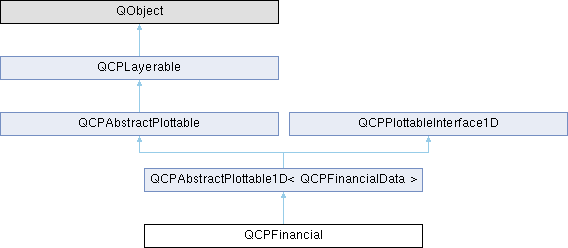
A plottable representing a financial stock chart. More...
Public Types | |
| enum | WidthType { wtAbsolute , wtAxisRectRatio , wtPlotCoords } |
| enum | ChartStyle { csOhlc , csCandlestick } |
Public Member Functions | |
| QCPFinancial (QCPAxis *keyAxis, QCPAxis *valueAxis) | |
| QSharedPointer< QCPFinancialDataContainer > | data () const |
| ChartStyle | chartStyle () const |
| double | width () const |
| WidthType | widthType () const |
| bool | twoColored () const |
| QBrush | brushPositive () const |
| QBrush | brushNegative () const |
| QPen | penPositive () const |
| QPen | penNegative () const |
| void | setData (QSharedPointer< QCPFinancialDataContainer > data) |
| void | setData (const QVector< double > &keys, const QVector< double > &open, const QVector< double > &high, const QVector< double > &low, const QVector< double > &close, bool alreadySorted=false) |
| void | setChartStyle (ChartStyle style) |
| void | setWidth (double width) |
| void | setWidthType (WidthType widthType) |
| void | setTwoColored (bool twoColored) |
| void | setBrushPositive (const QBrush &brush) |
| void | setBrushNegative (const QBrush &brush) |
| void | setPenPositive (const QPen &pen) |
| void | setPenNegative (const QPen &pen) |
| void | addData (const QVector< double > &keys, const QVector< double > &open, const QVector< double > &high, const QVector< double > &low, const QVector< double > &close, bool alreadySorted=false) |
| void | addData (double key, double open, double high, double low, double close) |
| virtual QCPDataSelection | selectTestRect (const QRectF &rect, bool onlySelectable) const Q_DECL_OVERRIDE |
| virtual double | selectTest (const QPointF &pos, bool onlySelectable, QVariant *details=nullptr) const Q_DECL_OVERRIDE |
| virtual QCPRange | getKeyRange (bool &foundRange, QCP::SignDomain inSignDomain=QCP::sdBoth) const Q_DECL_OVERRIDE |
| virtual QCPRange | getValueRange (bool &foundRange, QCP::SignDomain inSignDomain=QCP::sdBoth, const QCPRange &inKeyRange=QCPRange()) const Q_DECL_OVERRIDE |
| Public Member Functions inherited from QCPAbstractPlottable1D< QCPFinancialData > | |
| QCPAbstractPlottable1D (QCPAxis *keyAxis, QCPAxis *valueAxis) | |
| virtual int | dataCount () const Q_DECL_OVERRIDE |
| virtual double | dataMainKey (int index) const Q_DECL_OVERRIDE |
| virtual double | dataSortKey (int index) const Q_DECL_OVERRIDE |
| virtual double | dataMainValue (int index) const Q_DECL_OVERRIDE |
| virtual QCPRange | dataValueRange (int index) const Q_DECL_OVERRIDE |
| virtual QPointF | dataPixelPosition (int index) const Q_DECL_OVERRIDE |
| virtual bool | sortKeyIsMainKey () const Q_DECL_OVERRIDE |
| virtual int | findBegin (double sortKey, bool expandedRange=true) const Q_DECL_OVERRIDE |
| virtual int | findEnd (double sortKey, bool expandedRange=true) const Q_DECL_OVERRIDE |
| virtual QCPPlottableInterface1D * | interface1D () Q_DECL_OVERRIDE |
| Public Member Functions inherited from QCPAbstractPlottable | |
| QCPAbstractPlottable (QCPAxis *keyAxis, QCPAxis *valueAxis) | |
| QString | name () const |
| bool | antialiasedFill () const |
| bool | antialiasedScatters () const |
| QPen | pen () const |
| QBrush | brush () const |
| QCPAxis * | keyAxis () const |
| QCPAxis * | valueAxis () const |
| QCP::SelectionType | selectable () const |
| bool | selected () const |
| QCPDataSelection | selection () const |
| QCPSelectionDecorator * | selectionDecorator () const |
| void | setName (const QString &name) |
| void | setAntialiasedFill (bool enabled) |
| void | setAntialiasedScatters (bool enabled) |
| void | setPen (const QPen &pen) |
| void | setBrush (const QBrush &brush) |
| void | setKeyAxis (QCPAxis *axis) |
| void | setValueAxis (QCPAxis *axis) |
| Q_SLOT void | setSelectable (QCP::SelectionType selectable) |
| Q_SLOT void | setSelection (QCPDataSelection selection) |
| void | setSelectionDecorator (QCPSelectionDecorator *decorator) |
| void | coordsToPixels (double key, double value, double &x, double &y) const |
| const QPointF | coordsToPixels (double key, double value) const |
| void | pixelsToCoords (double x, double y, double &key, double &value) const |
| void | pixelsToCoords (const QPointF &pixelPos, double &key, double &value) const |
| void | rescaleAxes (bool onlyEnlarge=false) const |
| void | rescaleKeyAxis (bool onlyEnlarge=false) const |
| void | rescaleValueAxis (bool onlyEnlarge=false, bool inKeyRange=false) const |
| bool | addToLegend (QCPLegend *legend) |
| bool | addToLegend () |
| bool | removeFromLegend (QCPLegend *legend) const |
| bool | removeFromLegend () const |
| Public Member Functions inherited from QCPLayerable | |
| QCPLayerable (QCustomPlot *plot, QString targetLayer=QString(), QCPLayerable *parentLayerable=nullptr) | |
| bool | visible () const |
| QCustomPlot * | parentPlot () const |
| QCPLayerable * | parentLayerable () const |
| QCPLayer * | layer () const |
| bool | antialiased () const |
| void | setVisible (bool on) |
| Q_SLOT bool | setLayer (QCPLayer *layer) |
| bool | setLayer (const QString &layerName) |
| void | setAntialiased (bool enabled) |
| bool | realVisibility () const |
Static Public Member Functions | |
| static QCPFinancialDataContainer | timeSeriesToOhlc (const QVector< double > &time, const QVector< double > &value, double timeBinSize, double timeBinOffset=0) |
Protected Member Functions | |
| virtual void | draw (QCPPainter *painter) Q_DECL_OVERRIDE |
| virtual void | drawLegendIcon (QCPPainter *painter, const QRectF &rect) const Q_DECL_OVERRIDE |
| void | drawOhlcPlot (QCPPainter *painter, const QCPFinancialDataContainer::const_iterator &begin, const QCPFinancialDataContainer::const_iterator &end, bool isSelected) |
| void | drawCandlestickPlot (QCPPainter *painter, const QCPFinancialDataContainer::const_iterator &begin, const QCPFinancialDataContainer::const_iterator &end, bool isSelected) |
| double | getPixelWidth (double key, double keyPixel) const |
| double | ohlcSelectTest (const QPointF &pos, const QCPFinancialDataContainer::const_iterator &begin, const QCPFinancialDataContainer::const_iterator &end, QCPFinancialDataContainer::const_iterator &closestDataPoint) const |
| double | candlestickSelectTest (const QPointF &pos, const QCPFinancialDataContainer::const_iterator &begin, const QCPFinancialDataContainer::const_iterator &end, QCPFinancialDataContainer::const_iterator &closestDataPoint) const |
| void | getVisibleDataBounds (QCPFinancialDataContainer::const_iterator &begin, QCPFinancialDataContainer::const_iterator &end) const |
| QRectF | selectionHitBox (QCPFinancialDataContainer::const_iterator it) const |
| Protected Member Functions inherited from QCPAbstractPlottable1D< QCPFinancialData > | |
| void | getDataSegments (QList< QCPDataRange > &selectedSegments, QList< QCPDataRange > &unselectedSegments) const |
| void | drawPolyline (QCPPainter *painter, const QVector< QPointF > &lineData) const |
| Protected Member Functions inherited from QCPAbstractPlottable | |
| virtual QRect | clipRect () const Q_DECL_OVERRIDE |
| virtual QCP::Interaction | selectionCategory () const Q_DECL_OVERRIDE |
| void | applyDefaultAntialiasingHint (QCPPainter *painter) const Q_DECL_OVERRIDE |
| virtual void | selectEvent (QMouseEvent *event, bool additive, const QVariant &details, bool *selectionStateChanged) Q_DECL_OVERRIDE |
| virtual void | deselectEvent (bool *selectionStateChanged) Q_DECL_OVERRIDE |
| void | applyFillAntialiasingHint (QCPPainter *painter) const |
| void | applyScattersAntialiasingHint (QCPPainter *painter) const |
| Protected Member Functions inherited from QCPLayerable | |
| virtual void | parentPlotInitialized (QCustomPlot *parentPlot) |
| virtual void | mousePressEvent (QMouseEvent *event, const QVariant &details) |
| virtual void | mouseMoveEvent (QMouseEvent *event, const QPointF &startPos) |
| virtual void | mouseReleaseEvent (QMouseEvent *event, const QPointF &startPos) |
| virtual void | mouseDoubleClickEvent (QMouseEvent *event, const QVariant &details) |
| virtual void | wheelEvent (QWheelEvent *event) |
| void | initializeParentPlot (QCustomPlot *parentPlot) |
| void | setParentLayerable (QCPLayerable *parentLayerable) |
| bool | moveToLayer (QCPLayer *layer, bool prepend) |
| void | applyAntialiasingHint (QCPPainter *painter, bool localAntialiased, QCP::AntialiasedElement overrideElement) const |
Protected Attributes | |
| ChartStyle | mChartStyle |
| double | mWidth |
| WidthType | mWidthType |
| bool | mTwoColored |
| QBrush | mBrushPositive |
| QBrush | mBrushNegative |
| QPen | mPenPositive |
| QPen | mPenNegative |
| Protected Attributes inherited from QCPAbstractPlottable1D< QCPFinancialData > | |
| QSharedPointer< QCPDataContainer< QCPFinancialData > > | mDataContainer |
| Protected Attributes inherited from QCPAbstractPlottable | |
| QString | mName |
| bool | mAntialiasedFill |
| bool | mAntialiasedScatters |
| QPen | mPen |
| QBrush | mBrush |
| QPointer< QCPAxis > | mKeyAxis |
| QPointer< QCPAxis > | mValueAxis |
| QCP::SelectionType | mSelectable |
| QCPDataSelection | mSelection |
| QCPSelectionDecorator * | mSelectionDecorator |
| Protected Attributes inherited from QCPLayerable | |
| bool | mVisible |
| QCustomPlot * | mParentPlot |
| QPointer< QCPLayerable > | mParentLayerable |
| QCPLayer * | mLayer |
| bool | mAntialiased |
Friends | |
| class | QCustomPlot |
| class | QCPLegend |
Additional Inherited Members | |
| Signals inherited from QCPAbstractPlottable | |
| void | selectionChanged (bool selected) |
| void | selectionChanged (const QCPDataSelection &selection) |
| void | selectableChanged (QCP::SelectionType selectable) |
| Signals inherited from QCPLayerable | |
| void | layerChanged (QCPLayer *newLayer) |
Detailed Description
A plottable representing a financial stock chart.

This plottable represents time series data binned to certain intervals, mainly used for stock charts. The two common representations OHLC (Open-High-Low-Close) bars and Candlesticks can be set via setChartStyle.
The data is passed via setData as a set of open/high/low/close values at certain keys (typically times). This means the data must be already binned appropriately. If data is only available as a series of values (e.g. price against time), you can use the static convenience function timeSeriesToOhlc to generate binned OHLC-data which can then be passed to setData.
The width of the OHLC bars/candlesticks can be controlled with setWidth and setWidthType. A typical choice is to set the width type to wtPlotCoords (the default) and the width to (or slightly less than) one time bin interval width.
Changing the appearance
Charts can be either single- or two-colored (setTwoColored). If set to be single-colored, lines are drawn with the plottable's pen (setPen) and fills with the brush (setBrush).
If set to two-colored, positive changes of the value during an interval (close >= open) are represented with a different pen and brush than negative changes (close < open). These can be configured with setPenPositive, setPenNegative, setBrushPositive, and setBrushNegative. In two-colored mode, the normal plottable pen/brush is ignored. Upon selection however, the normal selected pen/brush (provided by the selectionDecorator) is used, irrespective of whether the chart is single- or two-colored.
Usage
Like all data representing objects in QCustomPlot, the QCPFinancial is a plottable (QCPAbstractPlottable). So the plottable-interface of QCustomPlot applies (QCustomPlot::plottable, QCustomPlot::removePlottable, etc.)
Usually, you first create an instance:
which registers it with the QCustomPlot instance of the passed axes. Note that this QCustomPlot instance takes ownership of the plottable, so do not delete it manually but use QCustomPlot::removePlottable() instead. The newly created plottable can be modified, e.g.:
Here we have used the static helper method timeSeriesToOhlc, to turn a time-price data series into a 24-hour binned open-high-low-close data series as QCPFinancial uses.
Member Enumeration Documentation
◆ ChartStyle
Defines the possible representations of OHLC data in the plot.
- See also
- setChartStyle
| Enumerator | |
|---|---|
| csOhlc | Open-High-Low-Close bar representation. |
| csCandlestick | Candlestick representation. |
◆ WidthType
Defines the ways the width of the financial bar can be specified. Thus it defines what the number passed to setWidth actually means.
- See also
- setWidthType, setWidth
| Enumerator | |
|---|---|
| wtAbsolute | width is in absolute pixels |
| wtAxisRectRatio | width is given by a fraction of the axis rect size |
| wtPlotCoords | width is in key coordinates and thus scales with the key axis range |
Constructor & Destructor Documentation
◆ QCPFinancial()
Constructs a financial chart which uses keyAxis as its key axis ("x") and valueAxis as its value axis ("y"). keyAxis and valueAxis must reside in the same QCustomPlot instance and not have the same orientation. If either of these restrictions is violated, a corresponding message is printed to the debug output (qDebug), the construction is not aborted, though.
The created QCPFinancial is automatically registered with the QCustomPlot instance inferred from keyAxis. This QCustomPlot instance takes ownership of the QCPFinancial, so do not delete it manually but use QCustomPlot::removePlottable() instead.
Member Function Documentation
◆ addData() [1/2]
| void QCPFinancial::addData | ( | const QVector< double > & | keys, |
| const QVector< double > & | open, | ||
| const QVector< double > & | high, | ||
| const QVector< double > & | low, | ||
| const QVector< double > & | close, | ||
| bool | alreadySorted = false ) |
This is an overloaded member function, provided for convenience. It differs from the above function only in what argument(s) it accepts.
Adds the provided points in keys, open, high, low and close to the current data. The provided vectors should have equal length. Else, the number of added points will be the size of the smallest vector.
If you can guarantee that the passed data points are sorted by keys in ascending order, you can set alreadySorted to true, to improve performance by saving a sorting run.
Alternatively, you can also access and modify the data directly via the data method, which returns a pointer to the internal data container.
- See also
- timeSeriesToOhlc
◆ addData() [2/2]
| void QCPFinancial::addData | ( | double | key, |
| double | open, | ||
| double | high, | ||
| double | low, | ||
| double | close ) |
This is an overloaded member function, provided for convenience. It differs from the above function only in what argument(s) it accepts.
Adds the provided data point as key, open, high, low and close to the current data.
Alternatively, you can also access and modify the data directly via the data method, which returns a pointer to the internal data container.
- See also
- timeSeriesToOhlc
◆ data()
|
inline |
◆ draw()
|
protectedvirtual |
Implements QCPAbstractPlottable.
◆ drawLegendIcon()
|
protectedvirtual |
Implements QCPAbstractPlottable.
◆ getKeyRange()
|
virtual |
Returns the coordinate range that all data in this plottable span in the key axis dimension. For logarithmic plots, one can set inSignDomain to either QCP::sdNegative or QCP::sdPositive in order to restrict the returned range to that sign domain. E.g. when only negative range is wanted, set inSignDomain to QCP::sdNegative and all positive points will be ignored for range calculation. For no restriction, just set inSignDomain to QCP::sdBoth (default). foundRange is an output parameter that indicates whether a range could be found or not. If this is false, you shouldn't use the returned range (e.g. no points in data).
Note that foundRange is not the same as QCPRange::validRange, since the range returned by this function may have size zero (e.g. when there is only one data point). In this case foundRange would return true, but the returned range is not a valid range in terms of QCPRange::validRange.
- See also
- rescaleAxes, getValueRange
Implements QCPAbstractPlottable.
◆ getValueRange()
|
virtual |
Returns the coordinate range that the data points in the specified key range (inKeyRange) span in the value axis dimension. For logarithmic plots, one can set inSignDomain to either QCP::sdNegative or QCP::sdPositive in order to restrict the returned range to that sign domain. E.g. when only negative range is wanted, set inSignDomain to QCP::sdNegative and all positive points will be ignored for range calculation. For no restriction, just set inSignDomain to QCP::sdBoth (default). foundRange is an output parameter that indicates whether a range could be found or not. If this is false, you shouldn't use the returned range (e.g. no points in data).
If inKeyRange has both lower and upper bound set to zero (is equal to QCPRange()), all data points are considered, without any restriction on the keys.
Note that foundRange is not the same as QCPRange::validRange, since the range returned by this function may have size zero (e.g. when there is only one data point). In this case foundRange would return true, but the returned range is not a valid range in terms of QCPRange::validRange.
- See also
- rescaleAxes, getKeyRange
Implements QCPAbstractPlottable.
◆ selectTest()
|
virtual |
Implements a selectTest specific to this plottable's point geometry.
If details is not 0, it will be set to a QCPDataSelection, describing the closest data point to pos.
\seebaseclassmethod QCPAbstractPlottable::selectTest
Reimplemented from QCPAbstractPlottable1D< QCPFinancialData >.
◆ selectTestRect()
|
virtual |
Returns a data selection containing all the data points of this plottable which are contained (or hit by) rect. This is used mainly in the selection rect interaction for data selection (data selection mechanism).
If onlySelectable is true, an empty QCPDataSelection is returned if this plottable is not selectable (i.e. if QCPAbstractPlottable::setSelectable is QCP::stNone).
- Note
- rect must be a normalized rect (positive or zero width and height). This is especially important when using the rect of QCPSelectionRect::accepted, which is not necessarily normalized. Use QRect::normalized() when passing a rect which might not be normalized.
Reimplemented from QCPAbstractPlottable1D< QCPFinancialData >.
◆ setBrushNegative()
| void QCPFinancial::setBrushNegative | ( | const QBrush & | brush | ) |
If setTwoColored is set to true, this function controls the brush that is used to draw fills of data points with a negative trend (i.e. bars/candlesticks with close < open).
If twoColored is false, the normal plottable's pen and brush are used (setPen, setBrush).
- See also
- setBrushPositive, setPenNegative, setPenPositive
◆ setBrushPositive()
| void QCPFinancial::setBrushPositive | ( | const QBrush & | brush | ) |
If setTwoColored is set to true, this function controls the brush that is used to draw fills of data points with a positive trend (i.e. bars/candlesticks with close >= open).
If twoColored is false, the normal plottable's pen and brush are used (setPen, setBrush).
- See also
- setBrushNegative, setPenPositive, setPenNegative
◆ setChartStyle()
| void QCPFinancial::setChartStyle | ( | QCPFinancial::ChartStyle | style | ) |
Sets which representation style shall be used to display the OHLC data.
◆ setData() [1/2]
| void QCPFinancial::setData | ( | const QVector< double > & | keys, |
| const QVector< double > & | open, | ||
| const QVector< double > & | high, | ||
| const QVector< double > & | low, | ||
| const QVector< double > & | close, | ||
| bool | alreadySorted = false ) |
This is an overloaded member function, provided for convenience. It differs from the above function only in what argument(s) it accepts.
Replaces the current data with the provided points in keys, open, high, low and close. The provided vectors should have equal length. Else, the number of added points will be the size of the smallest vector.
If you can guarantee that the passed data points are sorted by keys in ascending order, you can set alreadySorted to true, to improve performance by saving a sorting run.
- See also
- addData, timeSeriesToOhlc
◆ setData() [2/2]
| void QCPFinancial::setData | ( | QSharedPointer< QCPFinancialDataContainer > | data | ) |
This is an overloaded member function, provided for convenience. It differs from the above function only in what argument(s) it accepts.
Replaces the current data container with the provided data container.
Since a QSharedPointer is used, multiple QCPFinancials may share the same data container safely. Modifying the data in the container will then affect all financials that share the container. Sharing can be achieved by simply exchanging the data containers wrapped in shared pointers:
If you do not wish to share containers, but create a copy from an existing container, rather use the QCPDataContainer<DataType>::set method on the financial's data container directly:
- See also
- addData, timeSeriesToOhlc
◆ setPenNegative()
| void QCPFinancial::setPenNegative | ( | const QPen & | pen | ) |
If setTwoColored is set to true, this function controls the pen that is used to draw outlines of data points with a negative trend (i.e. bars/candlesticks with close < open).
If twoColored is false, the normal plottable's pen and brush are used (setPen, setBrush).
- See also
- setPenPositive, setBrushNegative, setBrushPositive
◆ setPenPositive()
| void QCPFinancial::setPenPositive | ( | const QPen & | pen | ) |
If setTwoColored is set to true, this function controls the pen that is used to draw outlines of data points with a positive trend (i.e. bars/candlesticks with close >= open).
If twoColored is false, the normal plottable's pen and brush are used (setPen, setBrush).
- See also
- setPenNegative, setBrushPositive, setBrushNegative
◆ setTwoColored()
| void QCPFinancial::setTwoColored | ( | bool | twoColored | ) |
◆ setWidth()
| void QCPFinancial::setWidth | ( | double | width | ) |
Sets the width of the individual bars/candlesticks to width in plot key coordinates.
A typical choice is to set it to (or slightly less than) one bin interval width.
◆ setWidthType()
| void QCPFinancial::setWidthType | ( | QCPFinancial::WidthType | widthType | ) |
Sets how the width of the financial bars is defined. See the documentation of WidthType for an explanation of the possible values for widthType.
The default value is wtPlotCoords.
- See also
- setWidth
◆ timeSeriesToOhlc()
|
static |
A convenience function that converts time series data (value against time) to OHLC binned data points. The return value can then be passed on to QCPFinancialDataContainer::set(const QCPFinancialDataContainer&).
The size of the bins can be controlled with timeBinSize in the same units as time is given. For example, if the unit of time is seconds and single OHLC/Candlesticks should span an hour each, set timeBinSize to 3600.
timeBinOffset allows to control precisely at what time coordinate a bin should start. The value passed as timeBinOffset doesn't need to be in the range encompassed by the time keys. It merely defines the mathematical offset/phase of the bins that will be used to process the data.
The documentation for this class was generated from the following files:
- qcustomplot.h
- qcustomplot.cpp